
Dry mode or cool mode? What each air conditioner setting does
What dry, cool, fan, auto and heat modes do, how they differ from fan speed and set temperature, and how to find the manual for your remote.
Last updated
Cool mode brings the room down to the temperature you set, and takes moisture out of the air while it is working hard to get there. Dry mode is for a humid day that is not hot: the unit runs gently to take moisture out while changing the temperature as little as it can, and it usually sets the fan speed itself. If the room is hot, use cool. If it is warm enough but sticky, use dry.
The rest of the remote makes sense once you separate five things: the mode, the fan speed, the set temperature, the airflow direction and the extras such as quiet, sleep and eco. The extras carry similar names on different brands and do different things, so the manual for your model is the key to them.
How to use this guide
Step 1: Find your manual
Read the model number off the unit and download the manual.
Go to Find your manualStep 2: Learn the five settings
Mode, fan speed, temperature, airflow and extras.
Go to The five settings
What is the difference between dry mode and cool mode?
| What differs | Cool mode | Dry mode |
|---|---|---|
| What it is for | Bringing a hot room down to the temperature you set. | Taking moisture out of a humid room that is not hot. |
| The set temperature | You choose it, and the unit works to reach it. | On many units the unit sets it and you cannot change it. On others you choose it as in cool mode. |
| The fan | You choose the speed, or leave it on auto. | On most units it sets the speed itself, and you cannot change it. |
| Moisture | Taken out while the unit is working hard. Once the room is within a couple of degrees of the setting the unit backs off and takes out much less. | Taken out steadily, with as little change in temperature as the unit can manage. |
| What you notice | Cooler air. On a mild, humid day the room can still feel clammy. | A room that feels less sticky, and may cool a little. |
| Use it when | The room is hot. | The room is warm enough but humid, such as on a mild, wet day. |
On a mild, humid day, cool mode can reach the setting quickly and then take out much less moisture, which leaves the room cool and clammy. That is the day for dry mode. It usually draws less power than cool mode, because the unit runs at a lower output, but it is not made to cool a hot room, and it does not heat. If the room feels clammy in cool mode on hot days as well, the unit may be switching on and off too often: the guide to oversized air conditioning covers that.
What does each setting on the remote change?
Most confusion comes from mixing these up. Each one changes one thing and leaves the others as they are.
| Setting | What it changes | What it does not change |
|---|---|---|
| Mode: cool, heat, dry, fan or auto | What the unit does: cool, heat, dry the air, move air only, or choose between heating and cooling. | How hard the fan blows, or where the air goes. |
| Fan speed: low, medium, high or auto, and on some units quiet | How much air the indoor unit moves. Auto lets the unit choose the speed. | Whether the unit heats or cools. Auto fan speed is not auto mode. |
| Set temperature | The temperature the unit aims for in the room. | The mode. In fan mode there is no temperature to set. |
| Airflow direction: the vane, the louvres and swing | Where the air goes: up, level or down, and on some units left or right. | How much air there is, or how warm or cold it is. |
| Extras: quiet, sleep or night, eco, powerful, timers | Something for a purpose, such as less noise, less power or a short burst of full output. What each does depends on the model. | Usually the mode you are in. |
Is fan mode the same as cooling?
No. Fan mode moves the room's air without cooling or heating it, much like a floor fan, and there is no temperature to set. Moving air feels cooler on the skin, but it does not lower the temperature or the humidity of the room. Use it on a mild day when moving air is enough.
Running fan mode for a while after cool or dry mode dries the inside of the indoor unit, and some units do it by themselves when you switch off. The manual for your model says whether yours does.
Should you use auto mode, or choose heat or cool?
In auto mode the unit chooses heating or cooling itself, from the room temperature and the temperature you set, and changes over when the room drifts a couple of degrees past the setting. That suits rooms that need heat in the morning and cooling in the afternoon, as on many spring and autumn days. In heat or cool mode the unit does that one thing only: in heat mode it will not cool a room that the afternoon sun has warmed, and you change the mode yourself when the season turns.
- Auto mode is not auto fan speed. AUTO on the fan button only lets the unit choose how hard the fan blows, in whichever mode you are in.
- Take care on a multi-split. Where several indoor units share one outdoor unit, they cannot heat and cool at the same time. Auto mode is not recommended on some multi-splits for that reason, so check the manual. The guide to an air conditioner that will not turn on or respond covers units set to opposing modes.
What do quiet, sleep and eco modes change?
These settings carry similar names on different brands and do different things. Quiet and sleep are not the same setting: quiet turns the indoor fan down, and sleep or night mode changes something for the night, which varies by model. The table gives the usual range. The manual for your model says which one yours does.
| Setting | What it usually changes | Check in your manual |
|---|---|---|
| Quiet | Turns the indoor fan down to its quietest speed, so the room may take longer to reach the setting. | Whether it is a fan speed or a separate button, and which modes it works in. |
| Sleep or night | It varies the most. On some units it dims the lights, stops the beeps and quietens the outdoor unit, and leaves the indoor fan as it was. On others it eases the setting up in cooling or down in heating as the night goes on, then switches the unit off on a timer. | Whether it changes the temperature, the noise or both, and whether it switches the unit off. |
| Eco or econo | Trades some output for less power, in different ways: on some units it caps the power the unit can draw, on others it swings the airflow and adjusts the setting, and on others it stops you setting it below 24°C in cooling. | What it limits, and that the room may take longer to reach the setting. |
| Powerful or turbo | Runs at full output for a short time to reach the setting sooner, commonly up to about 20 minutes, then goes back to normal. | How long it runs. |
| Outdoor quiet | Lowers the noise of the outdoor unit, for example at night for the neighbours. The output may drop a little while it is on. | Whether it runs on a timer. |
None of these is a fixed saving. What an eco setting saves depends on the model, the day and the room, and a setting that leaves the room uncomfortable is not worth having. To work out what your unit costs to run, see the guide to air conditioner output and electricity usage. For quiet at night, see the guide to choosing a quiet air conditioner for a bedroom.
Which way should the louvres point for heating and cooling?
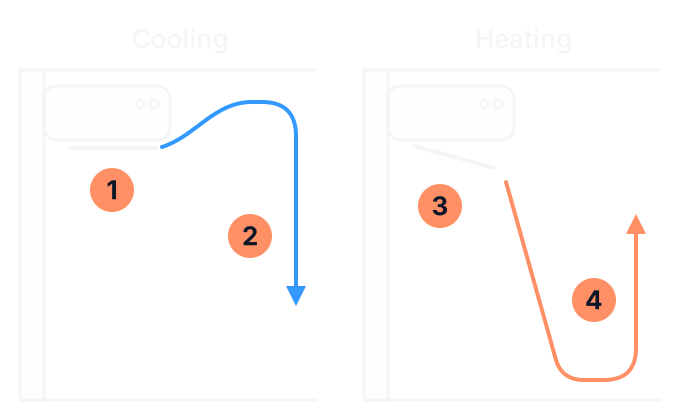
- Cooling: the vane level or angled up, so the air leaves along the ceiling.
- Cool air falls through the room, because it is heavier than warm air.
- Heating: the vane angled down, so the warm air reaches the floor.
- Warm air rises from the floor through the room.
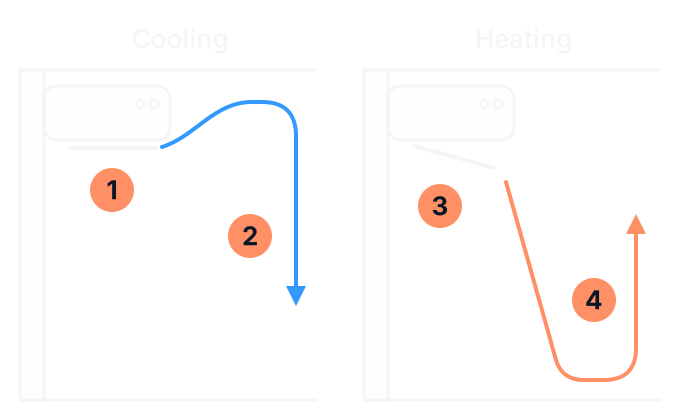
Point the air level or up for cooling and down for heating. Cool air is heavier than warm air, so cool air sent along the ceiling falls through the room, and warm air sent down to the floor rises through it. On many units the vane does this by itself when it is set to auto.
- Do not leave the vane pointing down for long in cool or dry mode. Water can form on the indoor unit and drip from it. Some units lift a downward vane by themselves after half an hour to an hour for that reason.
- Move the vane and louvres with the remote, not by hand. Forcing them can damage the mechanism, and a fan spins fast just inside the outlet. The exception is a unit whose manual says its side louvres are set by hand: follow the manual for how.
- Keep the air off someone sitting or sleeping. If the air lands on a chair or a bed, change the angle, or the left and right louvres if your unit has them.
Inherited a system? How to find the right manual
If you have moved into a home with a system already in it, do not rely on a chart of symbols from the internet or the guide to a universal remote. The same symbol can mean different things on different brands, and a feature on one model may be missing on the next. Find the manual for your model:
- Read the model number off the indoor unit. On a wall unit it is on a label on the side or along the bottom edge of the casing. On a ducted system, look for the label on the outdoor unit and the model on the front of the wall controller. Read it from where you stand, and do not open a cover to find it.
- Look on the back of the handheld remote for its model number. The remote does not always tell you the unit's model, so write down both.
- Download the manual from the maker's website. Daikin (opens in a new tab) lists its manuals by model, and Mitsubishi Electric (opens in a new tab) lists its remotes as well as its manuals. For other brands, look in the support section of the maker's Australian website.
- Ask the previous owner, the agent or the installer for the manual and the other papers that came with the system.
When we install a system, we walk you through how to run it and how its remote works. If you bought a home with a system in it, the guide to air conditioner warranties and workmanship covers the papers to ask for. To set the timers around your week, see the guide to planning timers around household routines.
Controller card for your air conditioner
When the settings are not the problem
If the unit is in the right mode and the room still does not cool or heat, the settings are unlikely to be the cause. Write down what it is doing and see the guide to an air conditioner that is not cooling or heating. A flashing light, a code or a unit that will not start is covered in the guide to an air conditioner that will not turn on or respond.
We service and repair air conditioners for homes and businesses in Bairnsdale and East Gippsland. Our air conditioner service page explains what a service covers, our air conditioning repairs page explains how to book a repair, and our air conditioning page covers everything else we do.
Sources (14)
Checked on 20 November 2026
- Daikin Australia: split system operation manual (opens in a new tab)
- Daikin Australia: dehumidification and home air conditioning (opens in a new tab)
- Daikin Australia: air conditioner heating and cooling guide (opens in a new tab)
- Daikin Australia: where to find the model and serial number (opens in a new tab)
- Daikin Australia: operation manuals (opens in a new tab)
- Mitsubishi Electric Australia: MSZ-AP operation manual (opens in a new tab)
- Mitsubishi Electric Australia: heat mode and auto mode (opens in a new tab)
- Mitsubishi Electric Australia: homeowner support and remote model list (opens in a new tab)
- Samsung Australia: using the air conditioner remote control (opens in a new tab)
- Fujitsu General Australia (AirStage): air conditioning controls, selection and features (opens in a new tab)
- Fujitsu General: where to find the model name (opens in a new tab)
- Actron Air: what the different modes on a system mean (opens in a new tab)
- Your Home (Australian Government): heating and cooling (opens in a new tab)
- ABL Refrigeration: air conditioning services (opens in a new tab) ABL's own page.
Related pages
- Air conditioning services
Installation, servicing and repairs for homes and businesses.
- Air conditioner not cooling or heating: what to check before you call
When the settings are right and the room is not.
- Planning AC timers and schedules around household routines
Set the timers around who is home and when.
Settings right, room still wrong?
Call ABL or send an enquiry, and have your controller card and the model numbers ready.
Filled in the record? Copy or print it first: it is not sent with a call or an enquiry.