
Food temperature and fridge air temperature: why the readings differ
Why a commercial fridge's display, an air sensor, a simulator, an infrared gun and a food probe give different readings, and which one answers which question.
Last updated
A commercial fridge's display shows the temperature of the air at its sensor, not the temperature of the food. Air warms and cools in minutes, at every door opening and every defrost. Food changes slowly, and it differs from shelf to shelf. So the display answers "is the fridge working?", and a probe in the food answers "is this food at 5°C or colder?". Use each one for its own question.
How to use this guide
Step 1: Know what each reads
Air, simulator, surface or food, and the question each answers.
Go to Which readingStep 2: Check them side by side
Take the display and probe readings together, once, and write them down.
Go to the record
Which reading answers which question?
| Reading | What it measures | How fast it changes | The question it answers |
|---|---|---|---|
| The fridge's own display | The air, or the coil, at the controller's sensor near the evaporator. | Within minutes. It jumps when the door opens and during a defrost. | Is the fridge running and holding near its setting? |
| A monitoring air sensor | The air where the sensor sits: near the door it reads warmer, in the cold air off the evaporator colder. | Within minutes. | When did the air go warm, for how long, and does it happen at the same times each day? |
| A product simulator | A sensor held in a small bottle of glycol or wax, a buffer that warms and cools more like stock does. | Slowly, so a door opening or a defrost barely moves it, while a lasting change still shows. | Has the stock around it had a sustained rise? It is still not your food. |
| A probe in the food | The food itself, at the point the probe reaches. The centre of the thickest part is the one that matters. | Settles in a short time once inserted. Wait for the reading to stop moving. | Is this food at 5°C or colder? This is the reading the food standards ask for. |
| An infrared thermometer | The surface the gun is pointed at. It cannot read inside the food, or through glass or clear plastic. | Instant. | A quick screen of a delivery or a display. It does not tell you the inside of the food. |
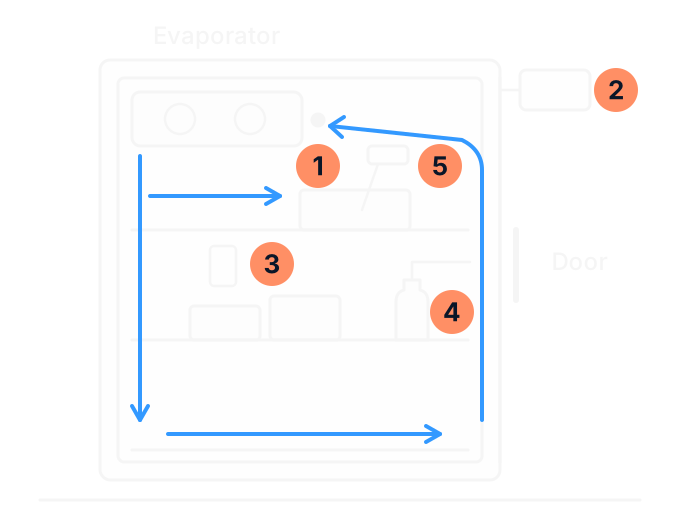
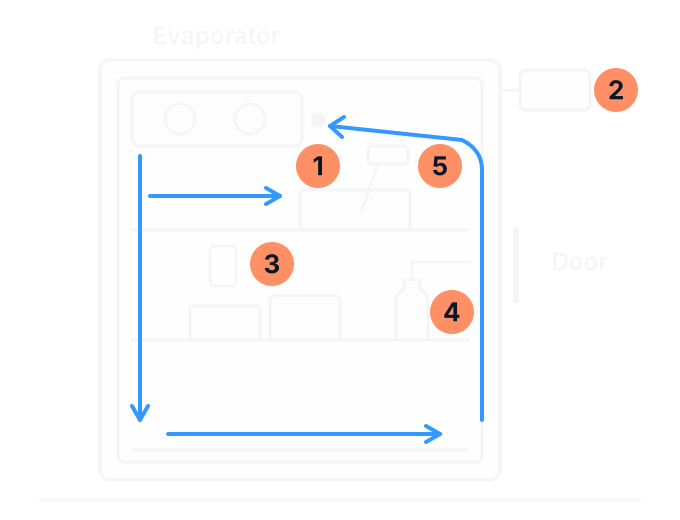
- The controller's sensor, usually in the air returning to the evaporator. It decides when the fridge runs.
- The display, which shows what that sensor reads.
- A monitoring air sensor on the side wall, between two shelves and clear of the cold air coming down the back, reading the air around it.
- A product simulator: a sensor in a small bottle of liquid standing on the shelf.
- A probe in the food, pushed into the thickest part.
Why the air and the food read differently
Air holds very little heat, so it changes fast. A tray of food holds a lot, so it changes slowly. Open the door and the air near it warms straight away, while the food on the shelf barely moves. The reverse is true too: food that went in warm can stay warm inside for hours while the air around it reads cold.
- Position. Every fridge has warmer and colder spots. Near a coolroom door the air can be as much as 5°C warmer than at the back, and two sensors less than a metre apart can read differently. Food in the cold air off the evaporator is coldest.
- The fridge cycling. The air warms and cools as the compressor stops and starts, so two readings a few minutes apart can differ by about 2°C without either being wrong. Compare the lowest and highest over a period, not one spot reading.
- Load. Food packed tight, or against the air ducts, stops cold air reaching what is behind it. Overstocking is the most common cause of a wide spread of temperatures.
- What went in. Warm stock or a delivery left out lifts the food long after the air has recovered.
- Inside and outside. The surface of a food item can be colder or warmer than its centre, and the centre is the one that counts.
So one good reading on the display does not show that every item in the fridge is at 5°C or colder. It shows the air at one point, at one moment.
Why the display jumps during a defrost
A fridge defrosts its evaporator at set intervals to clear the ice that builds up on it. While it does, the air near the evaporator warms, so a sensor there reads high for a while. Many controllers show a code such as dEF, or hold the last reading from before the defrost, until the defrost is over and for a set time after. On a logger graph a defrost shows as a regular spike, and in a coolroom the air reading can pass 5°C during it. The food changes far less than the air.
The difference between a defrost and a fault is the timing. A defrost comes at the same times each day, lasts about the same time, and the air comes back down soon after. A fault keeps going: the air keeps rising past the usual defrost time, does not come back down, or rises at times that match no defrost. A record of when the rise started, how long it lasted and what the probe read in the food is what a technician needs to tell the two apart.
An equipment alarm is not a food safety decision
A temperature alarm tells you that a sensor has read outside its limit for longer than the alarm's delay. It tells you the equipment needs attention. It does not tell you whether the food is still safe: the alarm may have been set on air, the sensor may sit in the warmest spot, and it knows nothing about how long each item was out of temperature.
The food decision is your business's, made from the food itself: probe it, and work out how long it has been above 5°C. Under Standard 3.2.2, potentially hazardous food is kept at 5°C or below, or at 60°C or above, unless the business can show another temperature is safe. Food Standards Australia New Zealand's guidance on keeping food at the right temperature (opens in a new tab) is the place to start. Your own food safety program, or your council's environmental health officer, decides the rest. For deciding in advance where stock goes when a fridge fails, see the guide to a commercial refrigeration contingency plan.
The display now and the record over time
The display shows this moment. A log shows what happened while nobody was looking. A fridge that stopped overnight and restarted before opening can read normal at opening time, and only the record shows the hours it spent warm. The opposite happens too: a display caught mid-defrost reads high when nothing is wrong.
Use both, and do not let one stand in for the other. The record shows the equipment's history and when to look closer. The probe shows the food. A daily probe check written down beside the logger's history gives you both, and the guide to a temperature record sheet for a commercial coolroom sets out what to write. To choose a logger or monitoring system, see the guide to choosing commercial refrigeration temperature monitoring.
Checking an infrared reading against a probe
An infrared thermometer reads the surface it points at. Food Standards Australia New Zealand says infrared thermometers are useful for quick checks and for packaged food (opens in a new tab), but that they measure only the surface and cannot measure the temperature within food. A shiny surface such as stainless steel reflects the room and reads wrong, the gun cannot read through glass or clear plastic, and one carried from a warm kitchen into a coolroom needs up to half an hour to settle before it reads true.
Use infrared to decide what to probe. If a surface reads near 5°C or above, put a probe into that item. For packaged food you do not want to open, lay the probe lengthwise along or between two packs: the reading is approximate, and the pack stays sealed.
Is your thermometer reading true?
A food business that handles potentially hazardous food must have a thermometer accurate to within 1°C, and a digital probe is usually the right kind. Within 1°C means a reading of 5°C puts the food between 4°C and 6°C. Food Standards Australia New Zealand recommends having it calibrated at least once every 12 months (opens in a new tab), ideally by its supplier or an accredited laboratory. A thermometer in hard daily use is worth calibrating more often: every six months is a sensible interval.
Between calibrations, an ice point check shows whether it is still working properly. Fill a container with ice and a little cold water, so the ice does not float, put the probe in for about 3 minutes and read it: it should read 0°C. Do it three times. If the readings vary by more than 1°C, have it serviced or replaced. Write down the date, which thermometer it was and how far it reads out. If it needs a correction of more than 1°C, replace it or have it professionally adjusted.
The checked probe can then check the fridge's display. Put it as close as you can to the fridge's own sensor, keep the door shut for at least 5 minutes, then compare the two. Do it at least every six months. An ice slurry does not suit a wireless logger: its sensor is slow, it may not be waterproof, and the water blocks its signal. Check a logger against a calibrated probe, or through its supplier's calibration service.
When the display and the food disagree
| What you see | What it usually means | What to do |
|---|---|---|
| Display high, food cold | A door opening, a defrost or a delivery has warmed the air for a short time. | Check again after the air has had time to recover. Write down the time and what was happening. |
| Display normal, food warm | Warm food went in, it sits in a warm spot, or air is not reaching it because of how the fridge is loaded. | Probe other items in other spots. Act on the food. If several items read warm, call for a repair. |
| Display and food both rising | The fridge is not keeping up. | Act on the food and call for a repair. Note when it started and any code on the display. |
| Your probe and the display differ by the same amount every day | One of the two instruments may be out. | Check your probe at the ice point first. If the probe is right, compare it beside the fridge's sensor, and have the sensor checked at the next service. |
For a fault, our coolroom and commercial fridge repairs page explains how to book and what to tell us. Your filled-in check below is the most useful thing to have to hand.
Display and food reading check
Who to call
We repair and service commercial fridges and coolrooms for businesses in Bairnsdale and East Gippsland, and we install temperature monitoring. Our temperature monitoring page covers sensors, simulators and alarms. If the food keeps reading warm while the display looks fine, book a repair and bring this check to the call. The test packs behind a cabinet's rating are explained in the guide to commercial fridge climate classes.
Sources (22)
- Food Standards Australia New Zealand: keeping food at the right temperature (opens in a new tab) Checked on 19 November 2026.
- Food Standards Australia New Zealand: thermometers (opens in a new tab) Checked on 20 November 2026.
- Food Standards Australia New Zealand: thermometers and using them with potentially hazardous food (opens in a new tab) Checked on 19 November 2026.
- Food Standards Australia New Zealand: Safe Food Australia, chapter on Standard 3.2.2 (opens in a new tab) Checked on 20 November 2026.
- NSW Food Authority: calibrating thermometers (opens in a new tab) Checked on 20 November 2026.
- True Manufacturing: STR, STA and STG installation manual (opens in a new tab) Checked on 19 November 2026.
- True Manufacturing: T-Series installation manual (opens in a new tab) Checked on 20 November 2026.
- Williams Refrigeration Australia: operating manual for upright and counter products (opens in a new tab) Checked on 19 November 2026.
- Hoshizaki: RT and FT series undercounter instruction manual (opens in a new tab) Checked on 19 November 2026.
- Dixell: XR30CX digital controller installing and operating instructions (opens in a new tab) Checked on 20 November 2026.
- Carel: ir33 smart electronic controller manual (opens in a new tab) Checked on 20 November 2026.
- Primex: thermobuffer specifications (opens in a new tab) Checked on 20 November 2026.
- ETI: product simulant probe for fridges and freezers (opens in a new tab) Checked on 20 November 2026.
- Clever Logger: why a logger shows a different temperature to the fridge (opens in a new tab) Checked on 20 November 2026.
- Clever Logger: where to place loggers (opens in a new tab) Checked on 20 November 2026.
- Clever Logger: high temperature alarms (opens in a new tab) Checked on 20 November 2026.
- Clever Logger: why an ice-slurry test does not suit a logger (opens in a new tab) Checked on 20 November 2026.
- ThermoWorks: infrared thermometers in food safety applications (opens in a new tab) Checked on 20 November 2026.
- ThermoWorks: infrared thermometers, care and use tips (opens in a new tab) Checked on 20 November 2026.
- Australian Government, energy.gov.au: refrigeration guide for businesses (opens in a new tab) Checked on 20 November 2026.
- Federal Register of Legislation: GEMS (Refrigerated Cabinets) Determination 2024 (opens in a new tab) Checked on 19 November 2026.
- ABL Refrigeration: commercial refrigeration services (opens in a new tab) ABL's own page. Checked on 20 November 2026.
Related pages
- Commercial fridge temperature monitoring and coolroom alarms
Sensors, simulators and alarms that ABL installs.
- A temperature record sheet for a commercial coolroom
What to write down each day.
- Choosing commercial refrigeration temperature monitoring: specify it, then test it
What to measure, where, and how to choose a system.
Food reading warm while the display looks fine?
Call ABL with your reading check in front of you, or send it with an enquiry.
Filled in the record? Copy or print it first: it is not sent with a call or an enquiry.